
Make the Most of Your Electric Appliances
Switching to efficient electric appliances can help you improve indoor air quality, lower your energy use, and reduce your environmental impact. Make the most of your electric appliances with our quick tips and post-install maintenance checklists.



Shift to a PG&E Rate Plan That Supports Electrification
PG&E offers a broad range of rate plans. For most homes with new electric appliances, PG&E's Electric Home Rate Plan (E-ELEC) offers the greatest savings.
Before making changes, compare available rate plans to ensure the best fit for your household. PG&E allows residential customers to change rate plans up to twice within a 12‑month period. Do not confirm the rate plan change unless you are certain that is the plan you wish to choose.
For Heat Pump HVACs, Change Your Baseline Allowance
By switching to a Heat Pump HVAC, you will be using more electricity and less gas to heat and cool your home. You will need to change your baseline allowance, which is the amount of energy you can use daily at the lowest price, in order to keep your bills down. Your baseline allowance is determined by where you live, your heating source, and the season.
- Change your Heat Source Code
-
On the Service Information page of your bill (usually page three), locate the line that says “heat source”. If it states “B” that means your home is registered as having a non-electric space heating system and you will be able to save money by calling PG&E to change it.
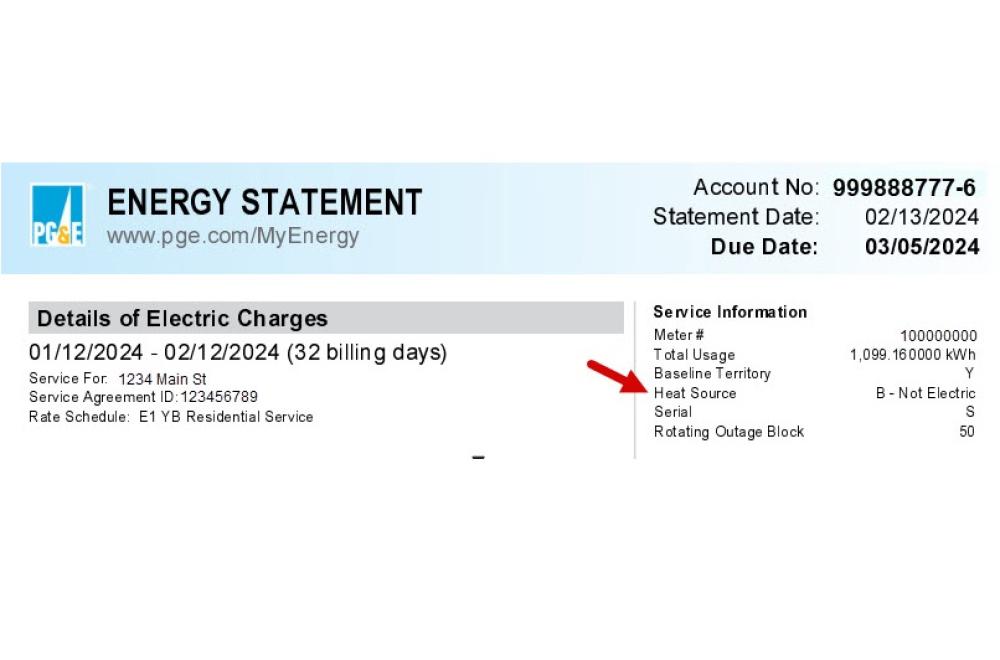
- Call 1-800-743-5000 to change your heat source code from non-electric to electric.
-
- Ensure your Baseline Allowance is changed
- Check your bill the following month to confirm the change has been made!
PG&E Rate Plan Comparison at a Glance
PG&E offers a broad range of rate plans. For most homes with new electric appliances, PG&E's Electric Home Rate Plan (E-ELEC) may offer the greatest savings.
Before making changes, compare available rate plans to ensure the best fit for your household. PG&E allows residential customers to change rate plans up to twice within a 12‑month period. Do not confirm the rate plan change unless you are certain that is the plan you wish to choose.
This comparison is provided as a general reference. Because rate plans, pricing, and program details can change, please refer to PG&E's website for the most up-to-date and complete information.
For solar customers, please reference PG&E's Solar Billing Plan Guide.
[Information last updated August 2026]
- A rate plan designed for homes with significant electric energy use, such as heat pump water heaters, heat pump HVAC systems, electric vehicles, or battery storage. Like other time-of-use plans, rates vary throughout the day, but E-ELEC includes a Base Services Charge, a fixed monthly fee that can result in lower electricity rates overall.
- Best for:
- Homes with heat pump appliances
- Electric vehicle owners
- Homes with battery storage
- Households that can shift some energy use to lower-priced hours
- Not recommended for:
- Low energy users
- Homes without heat pump appliances
- Additional considerations:
- For homes that have recently electrified, E-ELEC usually provides the greatest opportunity for savings
- Lower-priced hours generally occur overnight and during parts of the daytime, making it beneficial to run appliances outside peak periods when possible
- Customers with certain solar billing plans may be automatically enrolled in this plan
- If you install a heat pump HVAC system, you may qualify for an increased baseline allowance (see above)
-
The Time of Use Plan
- A rate plan where electricity costs vary depending on when energy is used. Rates are lower when demand on the grid is low and higher during peak demand periods.
- Best for:
- Households that can consistently shift electricity use to off-peak hours as savings depend on how much electricity can be moved outside of peak hours, which are from 4-9pm
- Customers without major electric appliances
- Households with solar power, if generally a low energy user
- Not recommended for:
- Most homes with heat pump appliances, electric vehicles, or battery storage
-
The Tiered Rate Plan
- A usage-based plan with two pricing tiers. Customers pay a lower rate up to their baseline allowance and a higher rate once that allowance is exceeded. PG&E determines baseline allowances depending on where you live and the season. Exceeding your baseline allowance can significantly increase electricity costs.
- Best for:
- Lower-energy-use households
- Homes with solar that regularly stay below their baseline allowance
- Not recommended for:
- Homes with high electricity use from heat pumps and potentially electric vehicles or other electrification upgrades (depending on your energy use)
- There are two EV rate plans available: the EV2-A Plan and the EV-B Plan.
- The EV2-A Plan combines home and vehicle energy use, offering lower prices during off-peak hours.
- The EV-B Plan separates home and vehicle energy costs. This plan requires the installation of a second meter.
- Best for:
- The EV2-A Plan is best for homes that can charge the following during off-peak hours: an electric vehicle, battery storage, and/or an electric heat pump.
- The EV-B Plan is best for those who want to track their EV charging separately from their home usage and/or cannot shift their home electric use to off-peak hours.
- Not recommended for:
- Homes with high electricity use from heat pumps and potentially electric vehicles or other electrification upgrades (depending on your energy use)
After you research all the plans available to you, you are ready to switch your plan!
Need more help making a decision? PG&E has a rate resources page.
Before You Switch Checklist
Have the following items ready to make your changes:
- PG&E account login information
-
If switching to the E-ELEC rate plan, gather information on one of the following:
- Electric vehicle: 17-digit VIN
- Heat pump appliance (e.g. heat pump water heater, HVAC central system, HVAC mini splits, or portable heat pump) or battery storage system:
- Model Number
- Serial Number
- Manufacturer
- Type of heat pump
- Installation Date
Entering multiple items does not increase your baseline allowance; a single verified asset unlocks the entire tier-free lower rate plan.
Steps to Switch Your PG&E Rate Plan
1) Change Your Plan Via Your Dashboard
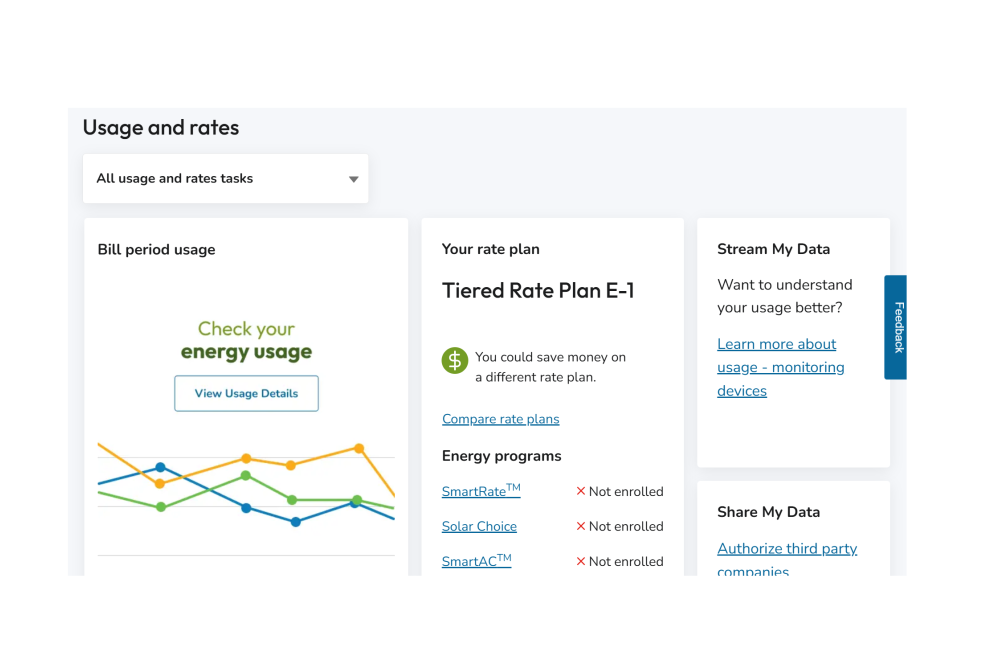
- When you log in to your account, go to your dashboard and scroll down to the “Usage and rates” section.
-
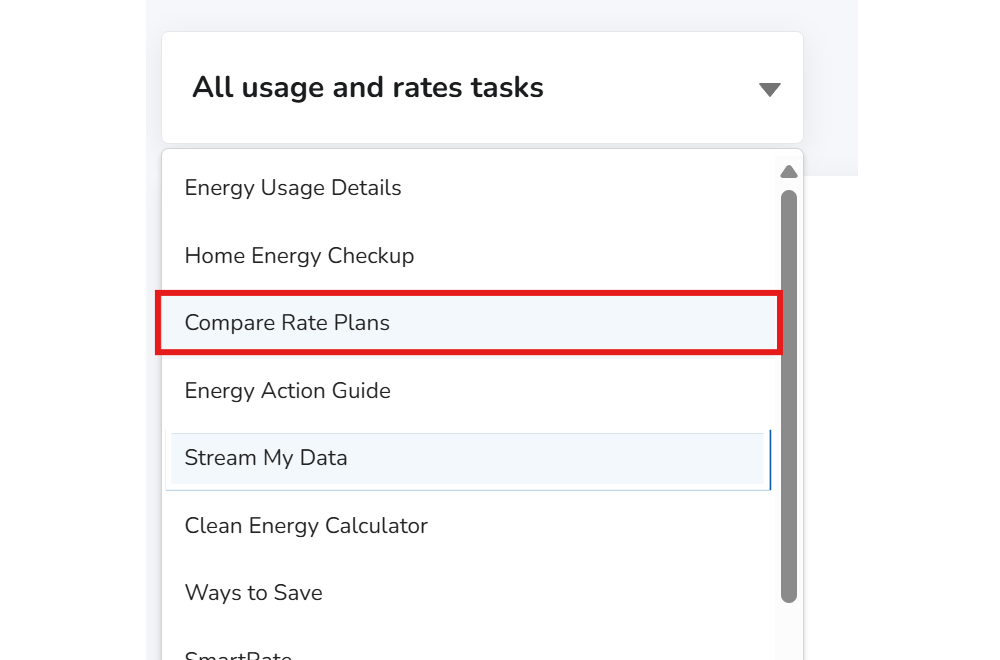
- Click on “All usage and rates tasks” and select “Compare Rate Plans.” You must continue with this step even if you already know the plan you want to enroll in.
-
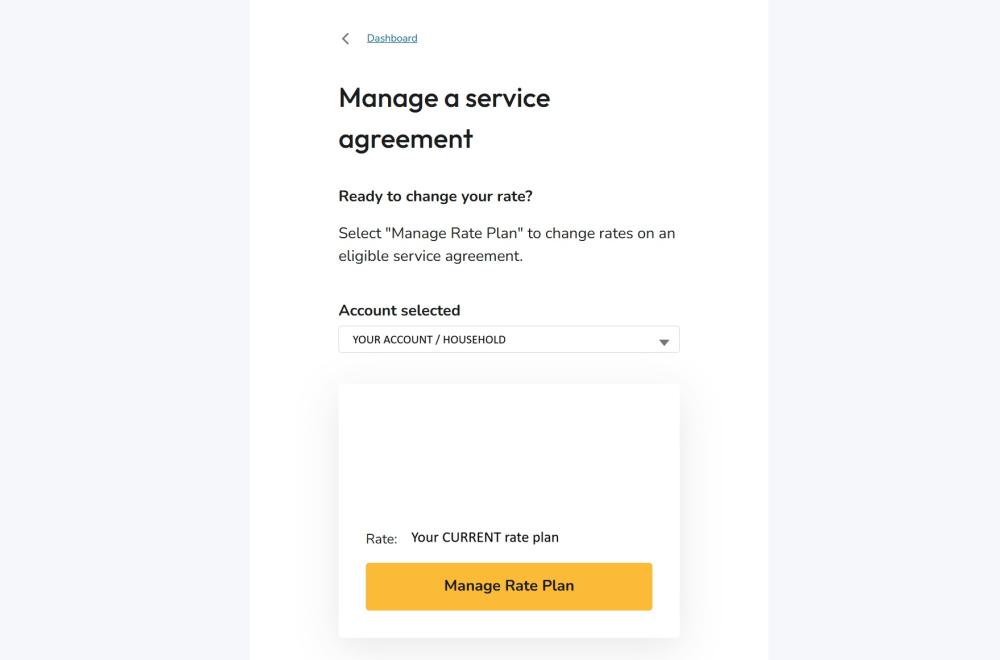
- You will be taken to a service agreement page. Make sure the correct account/household is selected, then click "Manage Rate Plan”
-
2) Select Your Desired Rate Plan
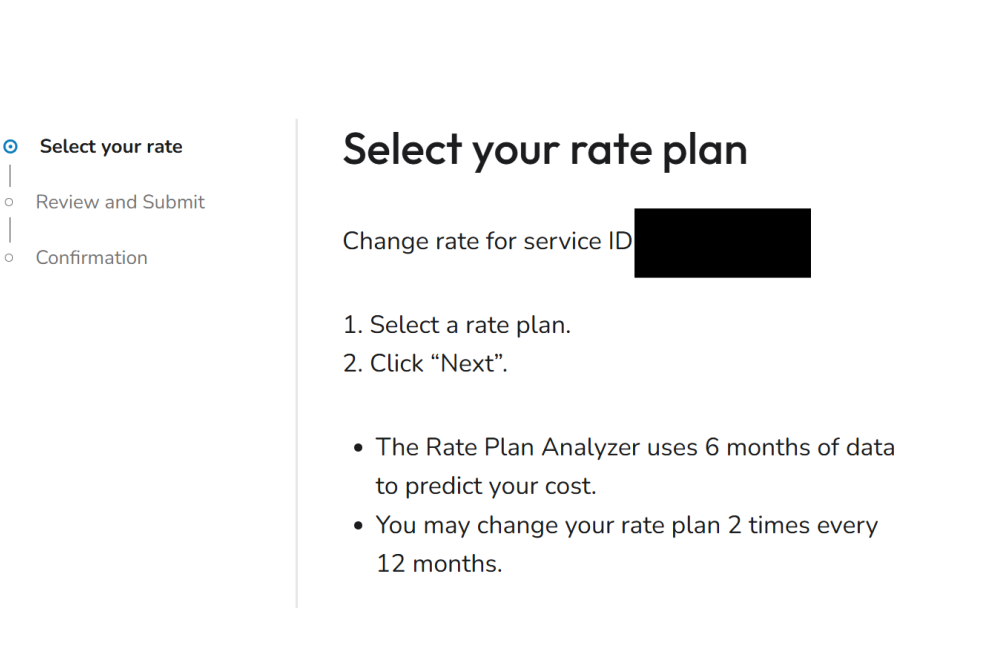
Remember: Customers may only change their rate plan twice within a 12-month period.
PG&E will show estimated prices based on the past 6 to 12 months of data. Prices may change once you have new appliances.
-
Select your plan
-
Make sure a blue dot appears next to your selected plan.
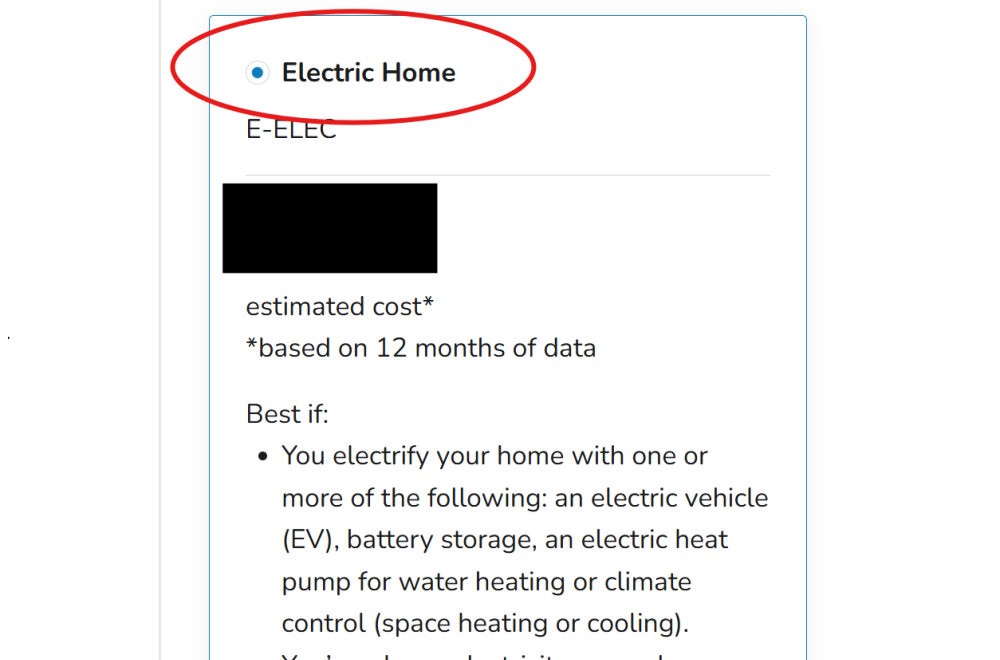
- Click “next” to review the selected plan and continue to submit your appliance information.
3) Confirm Your Plan & Submit Appliance Information
If you are enrolling in a rate plan that requires eligible electric equipment, such as the Electric Home Rate Plan (E-ELEC), PG&E may ask for information about your installed appliance(s) before your enrollment can be finalized. Device information is typically on a sticker located on the outside of your appliance. See the photos below for reference.
- Heat pump appliance (e.g. heat pump water heater, HVAC central system, portable heat pump, or HVAC mini splits) or battery storage system:
- Model Number
- Serial Number
- Manufacturer
- Type of heat pump
- Installation Date
Examples:
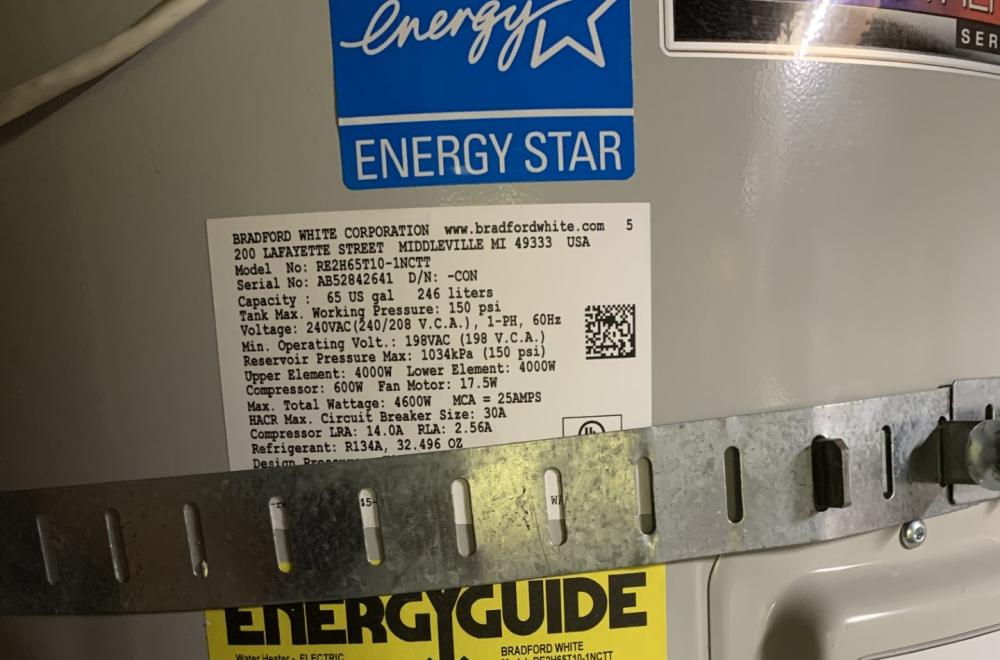
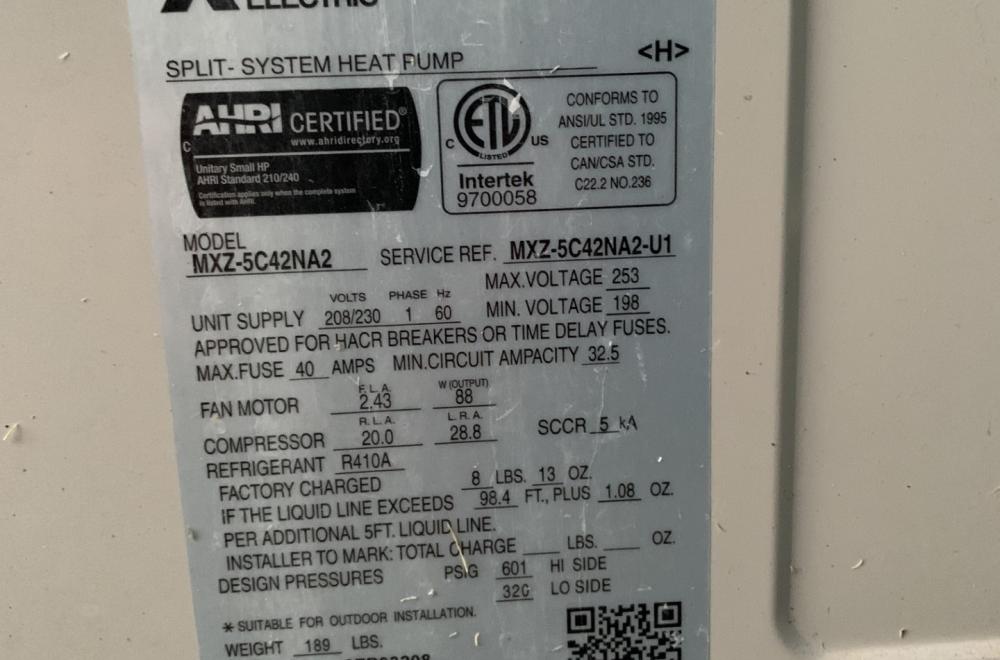
Note: Not all customers will be asked to provide appliance information. Follow the instructions displayed in your PG&E account during enrollment.
- Click Submit to complete your rate change request.
- After submitting your request, PG&E will send a confirmation email with your rate plan's effective date. Your new rate plan will generally take effect at the start of your next billing cycle.
Congratulations! You are officially saving money on your energy use, improving your home’s air quality, and helping improve the environment!
If your home is now fully electric, continue to the next step.
4) Set a Reminder to Check Your Energy Usage
The best way to make sure your energy plan is the most cost effective, check your energy usage dashboard to see your energy patterns. Comparing rate plans
5) If Your Home is Fully Electric, Consider Removing Gas Service from Your Home
Even if your home is fully electric, you may still be charged with a small ongoing gas service charge for as long as your home is connected to the gas system. You can fully disconnect your home from gas, or you can continue to pay if you want to install future gas appliances.
To disconnect your home from the gas system, request your gas service to be shut off by first using the Start, Stop, or Transfer Service page linked at the bottom of your PG&E Dashboard.
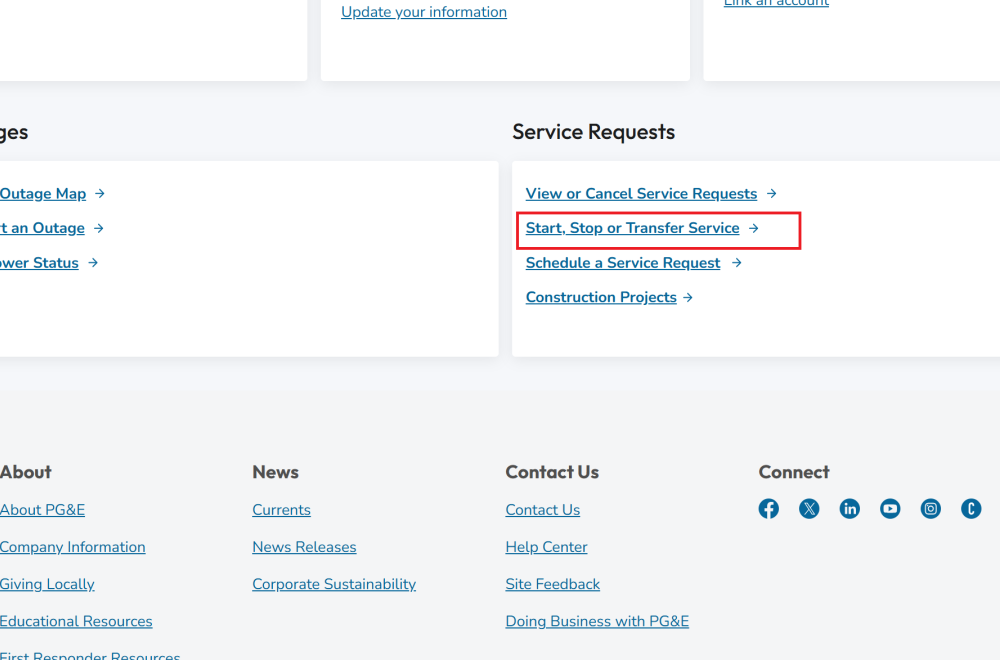
After submitting an online request, PG&E has six weeks to respond to your request. You can also follow up by calling 1-877-660-6789.
Heat Pump Water Heater (HPWH) Post-Install & Maintenance Checklist
Heat pump water heaters are three to four times more efficient than standard electric or gas models. Like any other appliance, your heat pump water heater requires regular maintenance. Follow the steps below to keep your appliances running smoothly!
Immediately After Install
Heat pump water heaters are three to four times more efficient than standard electric or gas models. Like any other appliance, your heat pump water heater requires regular maintenance. Follow the steps below to keep your appliances running smoothly!
- In your PG&E Account, switch to the right electric rate plan to maximize savings. Review the Shift to a PG&E Rate Plan That Supports Electrification section above for detailed instructions.
- In the manual, learn about your HPWH’s operational modes. Set your appliance to run at a time that works best with your rate plan, which may differ from factory settings.
- Enroll in the PG&E Watter-Saver Program. The program automatically heats water during lower-cost hours, helping reduce energy costs while earning monthly participation rewards. Plus, if you need to use your heat pump during peak hours, you still can.
Heat Pump Water Heater Maintenance
Review your model’s manual for specific instructions. The content below serves as a general checklist and reminder.
Every 3 to 6 months
- Clean the air filter. Your appliance filter light will turn on when it needs to be cleaned. Your cleaning cadence might depend on how often it is exposed to dust and debris.
- To clean it, turn off power to the unit, slide or pull out the filter from its housing, rinse it with water or mild soap, let it dry completely, and slide it back into place.
- Set your unit back to your desired mode.
- For pictures on step-by-step instructions, visit this website.
Signs your filter needs cleaning or replacement:
- Increased energy bills
- It takes longer for your water to heat
- The unit makes unusual noises
- Error codes on the digital display
If the filter does not work despite cleaning, or regular cleaning does not occur, you may need to order a replacement filter.
Every 6 months
- Test the temperature and pressure relief valve.
- Place a bucket under the pipe and release valve, then lift the lever slightly to ensure it releases water and closes properly. Ensure the lever returns to its closed position on its own. If there are any issues with the pressure relief valve, contact a professional.
- Inspect for leaks and noises. Do a visual inspection for rust or moisture on the floor and listen for unusual operating sounds. Contact a professional for unusual leaks and noises.
- Ensure one to two feet of space around the heater is clear for ideal airflow.
Annually
- Drain, flush, and refill your tank.
- Turn off your water heater before draining. Consult your owner’s manual for details on how to properly drain and flush your water heater.
- Water contains minerals that can lead to build up in the bottom of your tank, which prevents your unit from heating properly. Drain your water annually to help clean out any built-up sediment.
- Clean the condensate drain lines.
- Keep the drain line clean and unclogged by unscrewing it from the water heater and pouring a small amount of disinfectant like vinegar or bleach through the line. This will kill any algae, mold, or mildew that has formed in the pipe.
- Ensure the condensate flows freely and unclog if needed. If you have a lower metal drain pan with standing water, this might indicate that you have a clogged condensate drain pan or line, and cleaning is needed.
Heat Pump HVAC Post-Install & Maintenance Checklist
Ensure you are saving the most amount of money by switching your baseline rate! Go to the shift rate plan section and follow the step-by-step instructions to raise your PG&E Baseline Allowance.
Immediately After Install
- In your PG&E account, switch to the right electric rate plan for you to maximize savings and enroll in a new baseline allowance for space heating. Review the Shift to a PG&E Rate Plan That Supports Electrification section for detailed instructions.
- Set up your appliance control features through a smart thermostat or dedicated app. Your heat pump most likely can connect to Wi-Fi, allowing you to install a smart thermostat. With a smart thermostat, you can easily keep track of your energy usage and even qualify for potential rebates through PG&E.
- Review your Heat Pump HVAC settings and make sure they are optimized. Review the section on optimizing your HVAC settings for details.
Heat Pump HVAC Maintenance
Review your model’s manual for specific instructions. The content below serves as a general checklist and reminder.
Every 1 to 3 months
- Change the HVAC air filter: Follow the manufacturer’s recommendations for how often you clean and change the filter or change as needed.
- Keep shrubs and plants two feet away from the outdoor unit.
Annually
- Schedule an annual service call. An HVAC technician will complete a thorough inspection and make sure everything is working properly.
Optimizing Your Heat Pump HVAC Settings
Heat pumps work most efficiently when they run steadily rather than frequently turning on and off. By using the right settings for each season, you can improve comfort, reduce energy use, and lower operating costs.
- Avoid Auto mode when possible, to prevent unnecessary switching between heating and cooling. Instead, use Heat mode during colder months and Cool mode during warmer months.
- During winter, maintain a consistent temperature rather than frequently adjusting the thermostat. Setting the temperature much higher than your desired comfort level can increase energy use without heating your home more quickly.
- During summer, use Fan mode for light air circulation. If you need more relief, use Cool mode to lower temperatures.
- If your home also has a furnace or boiler, prioritize the heat pump whenever possible to maximize savings.
Tips to Get Comfortable Using Your Induction Cooktop
Induction cooking requires different techniques and cookware than gas cooking, but with a few tips, you’ll be cooking more efficiently in no time.
Visit the BayREN induction cooking page for recipes, tips, and videos featuring professional chefs cooking on induction!
Use Compatible Cookware
- Look for the “induction ready” symbol, a spiral or coil spring icon on the bottom of your cookware or on the packaging.
- Try the magnet test. Place a magnet on the bottom of your pan. If it sticks firmly, it will work with your induction cooktop.
Adjust Your Cooking Technique
- Induction cooktops heat up much faster than gas and offer more precise temperature control. Start with medium or lower heat until you get familiar with how quickly your cookware heats. Using high heat immediately can cause food to burn, and you should never overheat an empty pan.
- Match your pan size to the burner size for the best performance. If your pan is significantly larger than the cooking zone, it may not heat up efficiently or evenly.
Keep Your Cooktop Clean
- Once the cooktop has cooled, wipe it clean after each use to prevent spills and food residue from burning onto the surface.
- Lift your pans instead of sliding them on the cooktop to avoid scratching the glass surface.
Additional Resources
Maintenance & Support Resources
- Need help with appliance maintenance or repairs? Visit The Switch Is On to find qualified contractors, connect with electrification experts, and access educational resources about heat pumps and other electric appliances.
- Visit the PG&E Customer Support page for help with rate plans, billing, service requests, energy usage questions, language assistance, and accessibility services.
Track and Manage Your Energy Use
- Sign Up for California Flex Alerts to receive notifications when electricity demand is high and reduce energy use during peak periods. You will be notified via phone or email and can lower your energy usage during that time.
- Complete PG&E’s free five minute Home Energy Checkup for personalized recommendations on reducing your home energy use.
- Consider enrolling in a PG&E residential and third-party demand response program. You may qualify for financial incentives to reduce energy load during peak demand.
- Use Energy Upgrade California’s interactive Time of Use webpage to better understand peak and off-peak hours, and how shifting your use can lower your bills.
- If you have a SmartMeter, a digital meter that provides detailed information about your home's energy use, enroll in PG&E's Bill Forecast Alerts to track consumption and avoid unexpected charges.
Continue Your Electrification Journey
- Explore Rewiring America's Electrification Resources, including the Personal Electrification Planner to estimate costs and identify incentives, and practical guides to help you plan future home electrification projects.
- Explore PG&E's Interactive Electrification Tool to compare technologies, estimate costs, and learn about available rebates and resources.
- Visit PG&E's Customer Resources page for additional programs, calculators, FAQs, and energy-saving tools.